
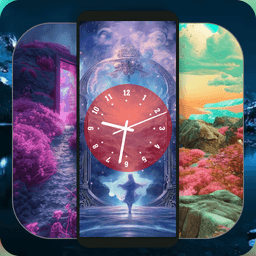
Screenshots
About Door Lock Screen wallpaper
Transform your lock screen with Door Lock Screen wallpaper — a customizable lock screen theme app that combines stunning visual designs with a functional live clock experience. Whether you want a sleek modern aesthetic or a cozy seasonal vibe, this app delivers door-themed wallpapers, photo effects, and elegant backgrounds tailored for every mood and season.
Create your perfect lock screen by starting with a template — choose from curated collections like Astral, Radiant, Night, Neon, Vintage, and Wall-mounted designs. Each template serves as your foundation, allowing you to layer personalization on top. Browse through an extensive library of sophisticated wallpapers before making your selection, then dive into four powerful customization options that let you fine-tune every detail.
Control your clock display with precision. Select from diverse clock designs featuring both digit and Roman numeral styles to match your chosen wallpaper perfectly. Customize clock hands by adjusting thickness, size, and appearance — choose between bold, statement-making hands or delicate, minimal ones depending on your aesthetic. Fine-tune clock colors to complement or contrast with your background, then adjust background color and opacity to create the exact visual balance you want. Whether you prefer a fully visible clock or subtle numbers that blend into the background, the opacity slider gives you complete control. Finally, scale the clock size to suit your phone's screen dimensions, ensuring the design enhances rather than overwhelms your wallpaper.
The app supports 14 languages, making it accessible to users worldwide. Navigate the intuitive settings screen to apply your custom theme without affecting your phone's security — your lock pattern, PIN, password, and fingerprint settings remain completely untouched. Browse single and double-door background themes using the convenient slider, comparing options side-by-side until you find the design that truly reflects your personal style.
Experience a seamless blend of form and function. Door Lock Screen wallpaper delivers customization depth typically found in advanced design tools, wrapped in an app that anyone can use immediately. Watch for regular updates bringing fresh wallpaper collections, new clock styles, and additional personalization features to keep your lock screen feeling fresh and inspiring.
Pros & Cons
Pros
- Extensive customization of clock design, colors, size, and opacity
- Large library of curated door-themed wallpaper templates across multiple styles
- Does not modify your lock screen security settings or credentials
- Supports 14 languages for worldwide accessibility
Cons
- Description does not mention ad presence or premium feature restrictions
- Requires app permissions typical of wallpaper apps, including device access
- No mention of offline functionality or local storage of wallpapers
- Regular updates promised but no clarity on update frequency or feature roadmap
Related Apps

AlienGUIse
Desktop themes and manager for Windows — transform your system with 5 futuristic designs.

SharpKeys
Remap keyboard keys to launch apps, media controls, and custom commands on Windows.

RocketDock
Desktop launcher for Windows — quick access dock with customizable icons and positioning.

Custom Resolution Utility (CRU)
Display resolution utility: Create custom resolutions for your monitor with precise refresh rate control.

Lagguy Wallpapers
Lagguy
4K & HD wallpapers for Android — minimal, abstract, nature, AMOLED designs with lifetime access

Lock Screen OS
Apps Genz
Customize your lock screen with widgets, photos, and notifications. Replace Android's default lock screen.
Latest Articles
Best Adobe Audition alternatives for desktop in 2026 (7 tested)
Jul 10, 2026

Best Adobe Podcast alternatives for desktop in 2026 (we tested 7)
Jul 10, 2026
Best AI computer-use agent apps for desktop in 2026 (we tested 7)
Jul 10, 2026

Best aimasukptn alternatives in 2026 (we tested 7)
Jul 10, 2026
Best Apple TV+ alternatives on desktop in 2026 (7 streaming services)
Jul 10, 2026